![PrintReleaf-2023-Horizontal-RGB.svg]](https://help.printreleaf.com/hubfs/PrintReleaf-2023-Horizontal-RGB.svg)
Before sending us a file
Commercial Print Partners must have followed instructions detailed in our Template & Reporting Requirements for Job Production Data article and coordinated with support@printreleaf.com to validate spreadsheet format.
-
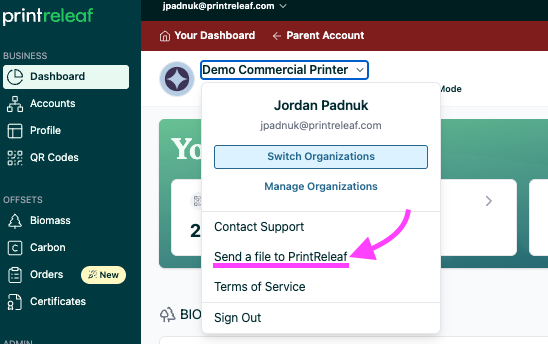
To send us your customers' volume report. Click your Company's name dropdown and select Send a file to PrintReleaf
-
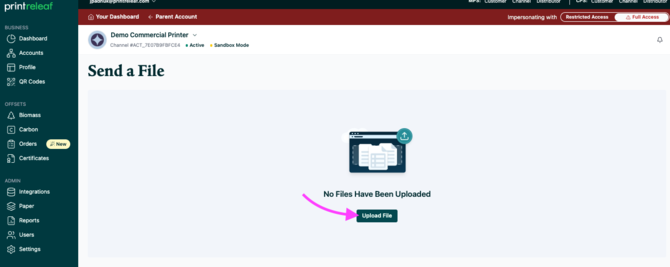
Click Upload File
-
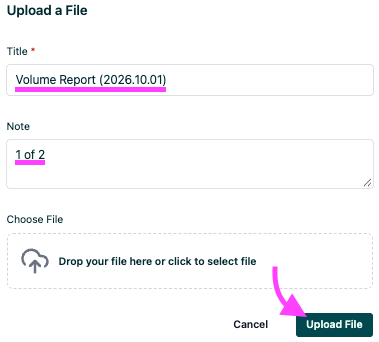
Add a Title to your file, and optional Notes. Drag your file int the Choose File box or
click into the box to select your file. Click Upload File to complete.
-
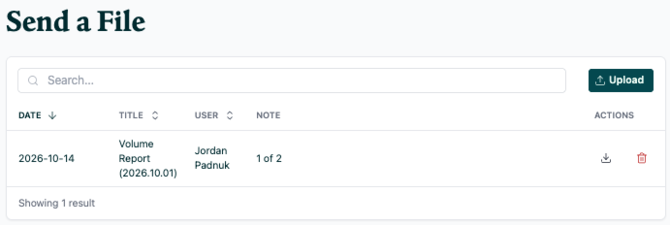
You have successfully submitted a file.
Note: Your customers' print jobs will be in a pending status until billing is processed, typically on the 10th of the month. Once processed, the volume is certified and added to your customer’s official lifetime offset certificate.